
In this course we learned the basics and skills to use AI tools to help supplement teaching and learning including practical applications in learning content development. We also learned about the ethical use of AI tools by both students and professionals.
Learning Outcomes
- Articulate definitions and categories of AI, including common AI applications in education.
- Articulate issues that arise in responsible AI use due to inaccuracies or hallucinations in AI-generated content.
- Apply AI tools to create original text, images, audio, and other digital content.
- Discuss the implications of using AI tools in teaching and learning, considering impacts on educational equity.
- Evaluate strengths and limitations of various AI content detection tools and strategies.
- Formulate policies regarding appropriate and ethical use of AI tools within their individual courses and instructional contexts.
- Explore ongoing learning opportunities related to AI tools.
- Compile a comprehensive portfolio demonstrating application of knowledge and skills gained throughout the course related to applying AI tools equitably and ethically in teaching and learning contexts.
- Develop practical skills in AI applications to enhance teaching and learning efforts.
Team Discussion: AI & Bias | Responsible Use
AI and Bias
While supporting our learners, we must help them recognize that the datasets used to train AI models rely heavily on large public databases, which can shape and reinforce these biases in the models’ outputs. These biases are found in cultural perspectives that often favor white, male, Western viewpoints (The University of Kansas, 2024). With this in mind, we know this doesn’t fit or support all situations that educators, learners, or instructional designers will face in every project or client contract. Because of this, our group discussed how to address these limitations when designing activities for learners. One such activity that we came up with was a prompting activity: Split learners into groups and each group will be assigned a specific local context (for example; a particular school district). Your task is to localize your prompt to that area. We ask you: “How would you write a prompt to address and correct bias in AI so that it best reflects and serves your assigned location?”
Afterward, come back together as a class to discuss your findings. Share the prompt you wrote, the school district/location you were assigned, and the specific terms, language, and tone you included in your prompt to help correct bias.
Responsible Use of AI Tools for Education
We, as people, have the opportunity to use AI responsibly by changing our perspective and viewing AI support as a type of learning aid rather than a shortcut to finished work. We can employ it for initial research, creativity, brainstorming, template creation, summarizing and synthesizing materials, and generating images and videos to support understanding through better engagement. As a community, we continually expand our knowledge by discovering new ways to support ourselves and others, using tools like AI to build on what tomorrow can look like. However, it is important to establish the difference between support and reliance.
As Cook (2026) states, adults who use generative AI to offload their tasks tend to lose capabilities they previously had, thereby weakening their critical thinking skills and autonomy as learners. When children similarly offload these tasks to AI, they never fully develop these essential lifelong skills in the first place. It is therefore important to draw clear distinctions between AI functioning as a tool that guides thinking and AI serving as an answer sheet that replaces it. To avoid skill erosion, it is critical to establish such boundaries and to use AI as a structured learning tool that supplements, rather than substitutes for, human effort when engaging with emerging AI technologies.
Image Prompting with Gemini
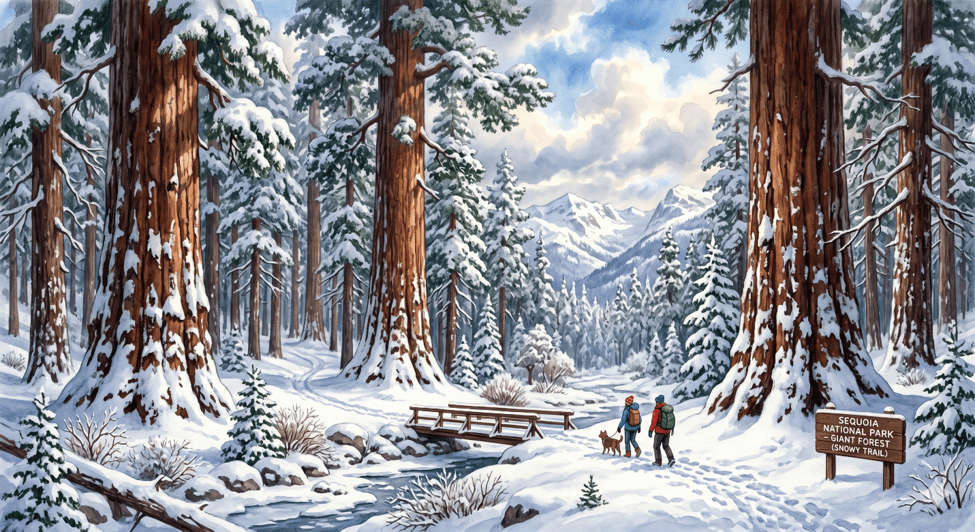
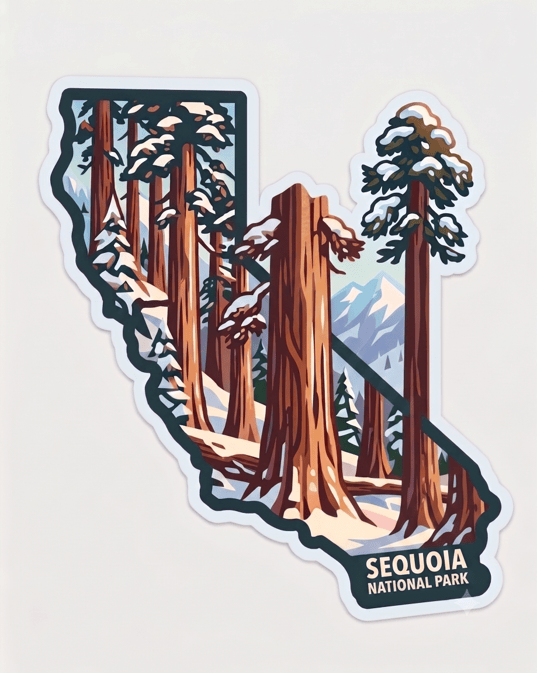
For this discussion activity, I decided to use Gemini to help me create an illustration I wanted to turn into stickers. This proved pretty challenging because it struggled to understand my final edits, and in the end I wasn’t able to get the final image I wanted.
My initial prompt was: “Make me an illustration of the landscape of Sequoia National Park, with trees covered in snow.”
Here is the image it generated:
Here is the final image after several revisions:
Deep Research with AI
For this week, I worked with Option 1.
- Select a deep research audience and topic: The Frog Lifecycle for Preschool Students.
- Select a model: ChatGPT
- Select a prompting strategy: Few-shot Prompting
- Write a prompt using the strategy selected: I am a preschool teacher about to teach kids ages 2-4 about the frog lifecycle for the first time. I want to keep it fun but scientifically accurate, with some interactive activities.
I want a summary to help me create this lesson. Focus on the Sierran Tree Frog specifically since that is native to our area. Create a deep research report that is no longer than 6 pages about the lifecycle of a frog to help create this lesson. It can include each phase of their life cycle, anatomy, and timelines about their growth. Provide references in APA style, ensuring they are academic. Do not include forum-based sites like Reddit or Quora. - Use an AI model and your prompt to create a deep research report: Sierran Tree Frog Deep Research Report
- Evaluate the output: The report created turned out well overall. I noticed it kept it simple, likely because it is meant for a preschool teacher to use with 2-3-year-olds, but the information is still scientifically accurate and reliable. All sources were academic papers. Overall, it did a decent job of separating the content into sections on the frog’s lifecycle and keeping the information relevant and very useful for creating a lesson for preschool-aged students.
- Use your output to create a prompt for an AI-generated instructional video. The video needs to have a clear audience, a defined style, at least two clear learning objectives, and be less than 3 minutes long:
Initial prompt: Using the provided deep research report, create a 2-3 minute video about the Sierran Tree Frog for preschool-aged children, around 2-4 years old. The lecture should be fun and animated; use music, keep all the concepts in, and make it very simple for them. Have it include a reference slide at the end in APA style.
Second prompt: Can you remake the video? Focus only on the life cycle basics. Remove the narration that says “step 1” or anything similar. Make it no more than 3 minutes long.
Final prompt: Redo the video, but the only change is to remove the ‘references’ text throughout and just keep the references at the very end in APA style. Use the references in the provided document.
- Link to your video: Sierran Tree Frog Journey
- Write a short reflection on the process of deep research and video generation:
Doing this deep research this week was really helpful in making me think proactively about what my research should be about and who the learners will be in the end. I wanted the research to focus on Sierran Tree Frogs, but I wanted the report to be for myself, as a preschool teacher about to teach kids about the frogs and their life cycle. I still wanted it to include more information about their habitat and other habits, but the final video would be meant only for preschoolers.
When generating the video, I asked for it to be 2-3 minutes to keep it an appropriate length for preschoolers. It was originally 6 minutes long, but I realized I had included too much information, so I made the learning objectives clearer. The next video it generated was much better, used age-appropriate language, and was short enough not to lose their attention. It did place random source text on random slides, sourcing my deep research PDF, so I had to rewrite the prompt a third time to get rid of that, which gave me my final result.
This entire process helped me realize the importance of using effective prompts not only to create the initial deep research report but also to produce a good video from that report. Providing clear details about personas and learning objectives was a total game-changer for the results it produced.
Team Discussion: Prompting
Here is our team’s discussion for this week’s assignment. We really enjoyed prompting and evaluating this lesson plan on Monarch butterflies.
Exploring AI Detection Tools
Read my worksheet here:DavidgeRocio_IST595_ActivityWorksheet.docx
Team Discussion: Promoting Critical Thinking with AI
HERE is our group assignment.
AI Policy
While working on this AI policy, I thought about who I wanted it to be directed at and how clear/transparent I wanted it to be. In this case, I opted to gear it towards graduate students, and I wanted it to be very transparent about when it is and isn’t allowed to try to avoid any confusion. I essentially set it up based on how much clarity I want to see in an AI policy for a course I’m in, to avoid any confusion when using it.
I really kept in mind a lot of the articles we have been reading throughout the course lately and wanted to include specific examples of when it’s encouraged to use it, and some where it is explicitly not allowed. I developed this policy by telling Gemini the specifics above about transparency, who it’s for, and ways to encourage self-critical thinking. I then followed up with a couple of examples that I liked and prompted it to develop one for me in a similar style, but with my specific requests.
Overall, I really liked the output. It’s simple and clear, and I feel like there isn’t much room for confusion if someone were to read this in their classroom about when it’s acceptable to use it.
Link to my AI Policy here: AI Policy
AI Portfolio
At the end of this course, we created a portfolio about what we learned when it comes to using AI in teaching and learning.
View my portfolio made here: Here

